
OopBuy Warehouse: Separate Received From Pending
Before selecting a parcel action, divide the OopBuy items into received, inspected, awaiting a requested check and still pending. Record quantity, option and the latest warehouse event for each row.
Use these as your own planning distinctions, not assumed names for buttons or account statuses. The important question is what has been confirmed for each item. A plan to combine purchases does not establish that all of them are already available for packing.
Make the parcel boundary clear
Do not include a pending item in packed weight or dimensions. QC photos can answer a visible question, but they do not prove that every unit has arrived or that a parcel is ready. Confirm the requested consolidation or storage action and its date.
For a hypothetical parcel containing two garments, check each garment separately before describing the parcel as complete. If one still needs a measurement clarified, keep that question visible in your plan. Deciding to wait, remove an item from the intended parcel or proceed is a separate decision from seeing a photo.
Resolve the item question first
Check quantity and the selected option against the relevant record. If a visible detail needs attention, state what you need to see or clarify. Avoid issuing a vague packing instruction while also expecting an unresolved product question to be addressed automatically.
The QC guide helps turn a concern into a specific image question. The size guide helps when the issue is a measurement method rather than a size label. Neither page establishes a guaranteed inspection scope or remedy for your order.
Understand the packing instruction
Before requesting a packaging change, identify what you want changed and why. Reducing bulk and retaining protective packaging are not always the same aim. Do not assume that removing packaging is appropriate for every product or that it guarantees a lower charge.
Ask about available options and their effect on the parcel before authorising them. Once the package information changes, revisit the shipping calculation. Keep an earlier estimate for comparison, but do not present its weight or dimensions as the final parcel's measurements.
Check storage terms for the actual item
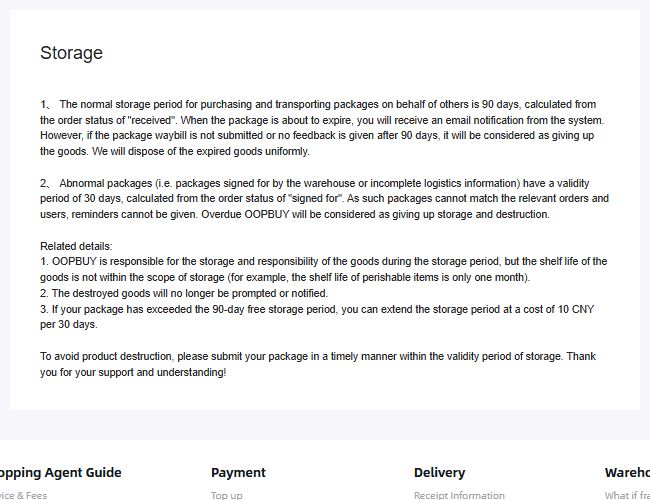
Saved policy view from 10 September 2026. This is the basis of the historical example below, not evidence that an individual item has been stored or extended.
OopBuy's storage guidance captured on 10 September 2026 distinguished a normal 90-day period beginning at the received status from a 30-day period for abnormal parcels beginning at signed-for status. It also described a paid extension of 10 CNY per 30 days after the free period, and disposal risks after expiry. These are dated policy details, not confirmation of your item's current deadline or an automatic extension.
Check which situation your item is in before using either period. If a courier delivery cannot be matched to your order, resolve the matching problem promptly; do not assume the normal deadline applies simply because tracking says delivered. Ask for the deadline and available action for the actual record.
Read the applicable storage information and the dates relevant to your account. Do not calculate a deadline using an unsourced general number of free days. If the starting event, fee or extension conditions are unclear, ask before planning around them.
Keep any answer tied to the item and date concerned. A past response about another order is not enough to establish the terms for a new one. Use support to resolve the specific uncertainty, and retain the response privately.
Follow the handoff separately
If you need a receiving address for a self-arranged delivery, obtain the instructions for your intended order from the platform first. A company's registered office, app developer address or another buyer's label is not a substitute. Confirm the recipient details and any reference required to match the incoming parcel to your account. Keep that account-specific information private.
An item being in a warehouse does not mean a carrier has received it. Check the order status and subsequent tracking events for those different steps. Keep the selected parcel contents and the actual parcel reference together so you can explain which shipment a question concerns.
Open a product detail if you are reconsidering a selection. That page does not show warehouse receipt for your order. The buying guide brings selection, inspection and parcel planning back into sequence.