
OopBuy QC Photos: Ask One Visible Question at a Time
An OopBuy QC image is useful when it is attached to the same listing and selected option and its view answers a visible question. It cannot establish hidden construction, comfort or authenticity.
Start with the limit of the inspection
OopBuy's inspection information preserved on 10 September 2026 describes checking product quantity, colour, size and specifications, while also listing exclusions including colour differences, size errors, use effects and certain technical or sealed-item checks. The distinction matters: a recorded size or colour is not the same as verified fit, exact colour reproduction or functional performance. This is a dated description, not confirmation of today's inspection terms.
Before relying on a check, establish what was actually examined for your item. Do not infer that every aspect has been tested simply because an inspection image exists. A clear photo can answer a narrow question well without answering every question about the product.
Match the image set before looking for defects
Compare the item description and selected option with the record that accompanies the photos. Where several similar products are involved, make sure you are not reviewing one item's label alongside another item's measurement. Keep quantity questions separate: a photograph of one garment does not establish that every unit of a larger order has been inspected.
Use the full view to orient yourself before zooming in. It helps you understand where a close-up belongs. Then decide what the close-up needs to show: a seam junction, a fastening, an edge or another visible feature. Do not identify damage from a tiny, ambiguous thumbnail when a clearer view could change the interpretation.
Match item, colour and size before reading a label or measurement. Use a full view for placement, a close-up for a visible seam and a flat, readable scale for a dimension. If the endpoint is hidden or the lighting changes colour, record the limit instead of guessing.
Make a measurement request specific
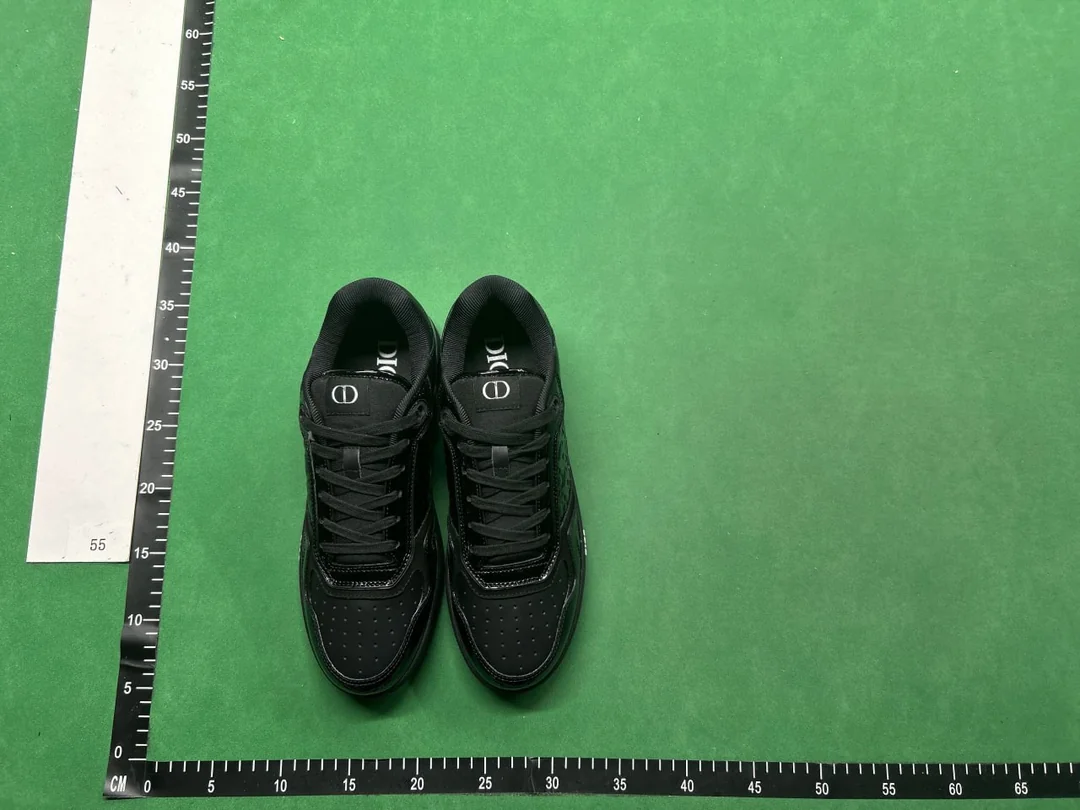
In this community QC photograph, the overhead view shows the laces, tongues and perforated toe areas together. It is useful for locating a visible detail before requesting a close-up. It cannot reveal outsole tread, internal length or the rear of the heels. Although rulers surround the shoes, their position and the camera angle do not provide a reliable fit measurement. These are not photographs of the separate OG product reference below.
For a hypothetical sleeve-length question, establish the start and end points used by the size chart. A photograph taken from another start point may show a readable number but answer a different question. Ask for the relevant span to be visible, including both endpoints and the scale, rather than requesting “more QC” without explaining the concern.
Compare that measurement using the same method on a garment you already wear. If the item is folded or the tape is angled, avoid treating the result as a precise comparison. The size guide explains why flat width, circumference and body recommendations should not be mixed.
Describe what you see without exaggerating it
“The edge is not visible in this image” is different from “the edge is damaged.” “The colour looks different under this lighting” is different from a confirmed colour mismatch. Keep the observation separate from the explanation you suspect.
If the issue would change your purchase decision, clarify it before moving on. If you decide the available image is sufficient for a specific visible detail, do not expand that conclusion into a promise about comfort, durability or concealed construction. Use support for an item-specific question and check the applicable options before assuming a remedy is available.
Keep QC separate from parcel readiness
An image set does not by itself establish that all items have arrived, that a parcel has been packed or that it has left the warehouse. Check the warehouse record and order status for those different stages. Only use relevant parcel information in the shipping calculation.
View the product detail as a product reference, not as QC evidence for an order. Remove private identifiers before sharing a crop, then keep the question and the inspected view together.
Before posting publicly, check the whole image for names, addresses, order references, labels and codes. Keep the original privately if you need it to explain an issue. Return to the spreadsheet guide once the product question is resolved, rather than letting a photo stand in for every later purchase check.