
OopBuy Spreadsheet Review: Separate Lists from Experiences
Review a collection and review an order as two different jobs. A dated account should identify its item, option, destination and completed stage before you compare it with another account.
For an OopBuy spreadsheet review, start with the collection itself: can you find a relevant item, open the destination, understand the variant and return to the explanation? Those checks describe browsing usefulness. They do not establish how a payment, a support request or a parcel will turn out.
What the platform description actually supports
OopBuy's English Google Play description, consulted on 25 September 2026, presents order management, product photos, tracking and pre-order product-weight information as app features. This is the publisher's description, not a purchase test performed for this article.
It helps identify the kinds of information a buyer may want to examine. It does not supply a shipping quote for your parcel or establish that an image answers your particular fit question. Keep the feature description beside the task it is meant to help with, rather than treating it as a general verdict on every purchase.
A specific complaint is more useful than an unexplained score
An English Google Play review dated 16 September 2026 raises concerns about shipping choices, support and packaging. These are the reviewer's reported experiences, not independently verified findings here. The account does not establish how often those problems occur.
For your decision, separate the issues. A concern about shipping choices suggests checking the services available for your destination and package. A concern about packaging suggests understanding the packing options before authorising them. Neither question is answered by a product's appearance in a spreadsheet.
Avoid importing a reviewer's price into your own budget when their package inputs are unclear. A strong positive or negative opinion can help identify a question, but it cannot fill in missing weight, dimensions, route or destination details.
Review the collection with an actual browsing task
Choose an item category you genuinely need. Open a candidate and compare the destination with the saved description. Check whether the option you want can be identified and whether measurements or images help answer your next question. Note where you had to leave the collection to obtain missing information.
Then try returning to the category and finding the item again. Clear navigation matters because you will often compare several candidates before choosing. This is a method you can apply, not a claim that every page in this collection has passed an interactive test.
The best spreadsheet article explains the comparison in more detail. The links article addresses changed destinations and duplicate entries.
Keep product, QC and delivery conclusions separate
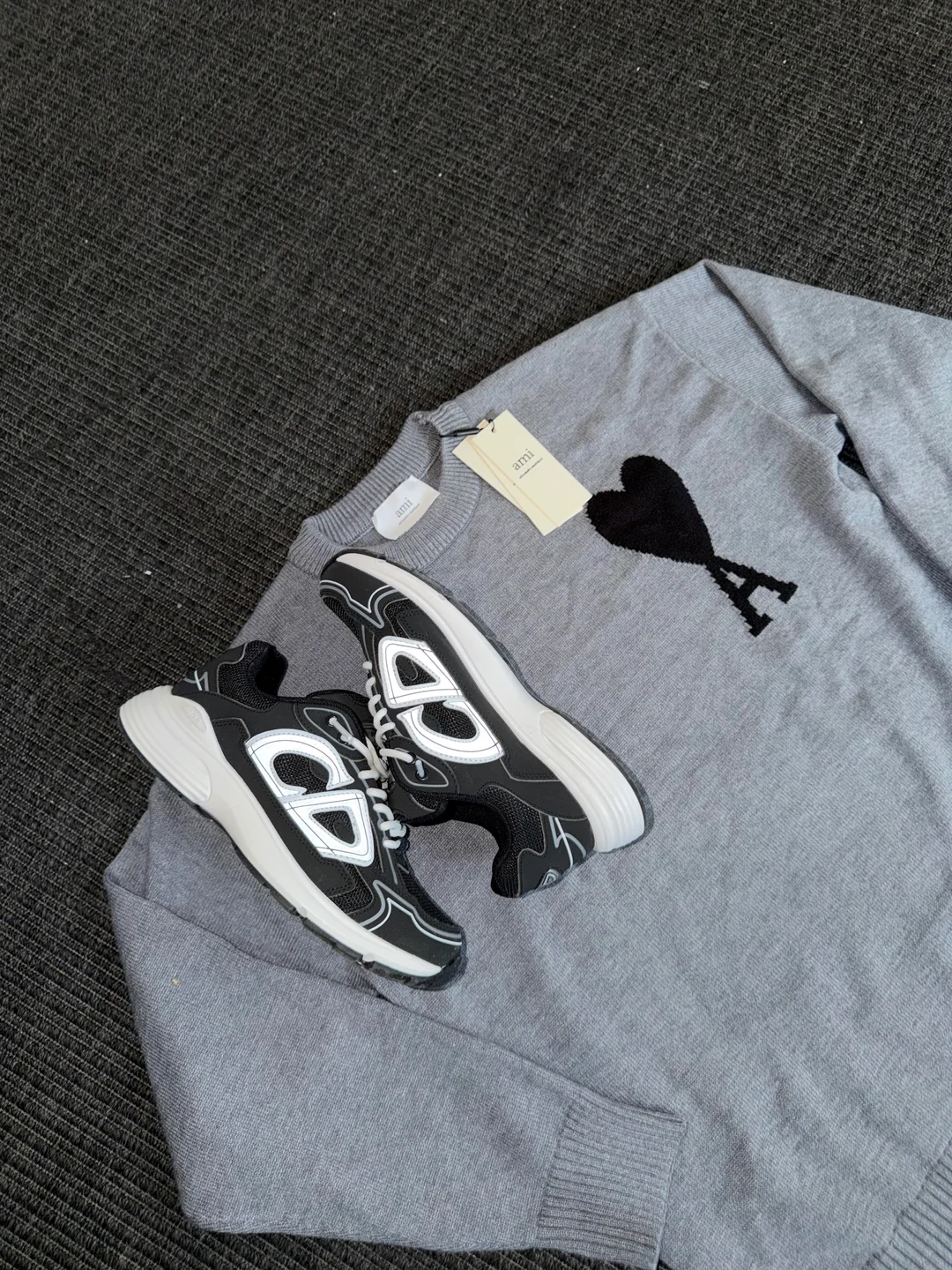
This community photograph was inspected on 27 September 2026 in the post “First oopbuy order to Sweden.” The visible items support a narrow description of their appearance: shoes, a grey knit garment and attached tags. The author reports a positive experience, but the image does not show shipping charges, a delivery timeline or how the items perform after wear. It therefore illustrates why a favourable product photograph and a verified service outcome are separate parts of a review.
This is not an order placed for this article. Neither the photographed knit nor the shoes are established as the OG product linked below. Keep that separation when comparing a community post with your own spreadsheet shortlist.
A photograph may help you examine a visible feature, while a delivery account describes a different part of the transaction. A good delivery experience does not establish that a size will fit you; an attractive product image does not establish the delivery outcome.
When writing your own notes, describe the observation before the conclusion. For example, identify which measurement or image informed the choice rather than writing only “good quality.” If you have not used the item, do not turn a visible detail into a claim about long-term wear.
Keep observations about links and fields separate from reports about payment, QC or delivery. Preserve the scope of any amount or time statement; one report is not a universal quote. To practise comparing a saved description with its destination, open the white floral-lightbulb graphic T-shirt. That shirt is a separate catalogue example, not either of the items in the community photograph.
Use spreadsheet links for source checking and safety guidance before sharing sensitive records.
For a complete buying sequence, continue to the OopBuy spreadsheet guide. Use reviews to sharpen the questions you ask at each step, not to skip those steps.
Identify what kind of post you are reading
A product recommendation, a warehouse photograph and a delivery report answer different questions. Before saving the information, decide which one it is.
| Post type | Useful detail to retain privately | Question still to check |
|---|---|---|
| Product find | Public product address and described option | Does the destination match the recommendation? |
| QC image | Item and feature the image actually shows | Does it describe your item or just a similar one? |
| Shipping experience | Stated destination, dates and parcel context | Are those circumstances relevant to your plan? |
| Coupon message | Named offer and stated conditions | Is it available and applied at your own transaction step? |
Do not merge these into one quality score. A useful product find says nothing by itself about the service used for someone else's parcel. The review guide explains how to keep reported experiences within their scope.